
Integrate API
Home
Company
Company
  • Company
  • Users
  • Office
Orders
Orders
  • Orders
  • Change Request
  • Drafts
  • GoToScan
Webhooks
Home
Company
Company
  • Company
  • Users
  • Office
Orders
Orders
  • Orders
  • Change Request
  • Drafts
  • GoToScan
Webhooks
  1. Default module
  • Default module
    • Get started
    • Pagination and Offset
    • Company
      • Get company information
      • Delete company webhook
      • Get company package
      • Send a merge request to another company
    • Office
      • List all offices
      • Add new office
    • Users
      • List all users
      • Add new user
      • Get user by email
      • Update user details
      • Change user password
      • Send password reset link
      • Delete user
    • Orders
      • List orders
      • Upgrade order
      • Re-deliver order with styling options
      • Get order by ID
      • Get combined PDF document
      • Create a redraw order
    • Change Request
      • Add new change request for an order
      • List all change requests of order
      • Get change request by ID
    • Draft Orders
      • Create a draft order
      • Update a draft order
      • Delete a draft order
    • GoToScan Orders
      • Create a GoToScan order
    • Webhooks
      • About webhooks
      • Update company webhooks
      • /Order status
  • Webhooks calls
    • /Order status
  1. Default module

Get started

CubiCasa Integrate API 3.0#

CubiCasa Integrate API is meant to integrate your production workflow with CubiCasa.
It allows you to continue the use of the familiar CubiCasa mobile app and integrate
your own order management system to CubiCasa. For further customization, Exporter API
enables individual styles for every floor plan and Quick Edit eases the job of your
own help desk. The diagram below represents how the orders flow through the CubiCasa
platform.
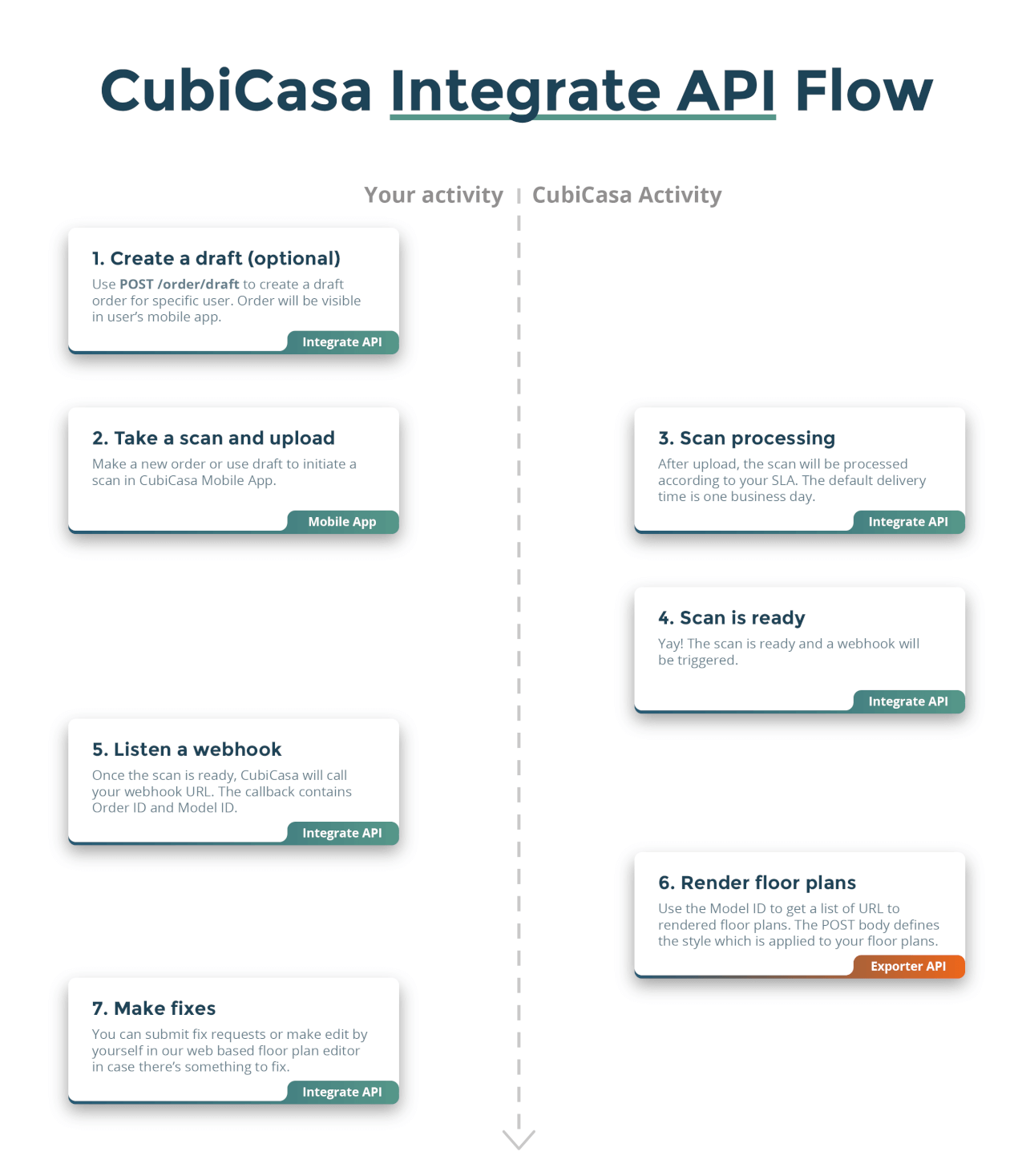
Integrate API Flow

Something doesn't work?#

Please contact developer.support@cubicasa.com and describe your issue, this API is work in
progress so unfinished or undocumented features may still exist.

How to get started#

Start your development against the staging environment and move to production when
your system is ready for production.

Create an API key#

Staging environment#

API base url: https://qa-customers.cubi.casa/api/integrate/v3
In order to use the staging version of the API, you'll need a staging API key.
Create a staging account and then visit
your company developer page
to create an API key from the UI. By default, this API documentation refers
to the staging version of the API.
Use a fake credit card for your company account:
Credit card number: 4242 4242 4242 4242
Expiry: 1/2025
CVC: 123

iOS and Android app access for staging environment#

In case you need to access CubiCasa mobile app (iOS or Android) in staging
environment (most likely you'll need), please contact developer.support@cubicasa.com
and share your Apple ID email or Google Play Store email with us and we'll add you
to Apple's Testflight or Google's testing program.

Production environment#

API base url: https://app.cubi.casa/api/integrate/v3
In order to use the production version of the API, you'll need a production API key.
Visit your company developer page
to create an API key from the UI.
Similarly to the staging environment, you can create an account, but you'll need
to use a real credit card or some other form of payment prearranged with our Sales
team, to access the service. By default, this API documentation refers to the
staging version of the API.

iOS and Android app access for production environment#

For production, you can just download the apps from the App Store or
Google Play Store. You'll need to leave the Android testing program
before you can download the production version. For iOS the App Store
download replaces the TestFlight installation.

Usage#

This API follows REST best practices with one small exception: User resource
is requested with the user email instead of user ID. All other resources use IDs
for identification.

Error messages#

The API follows standard HTTP response status codes. Most common error
scenarios are returned with a descriptive status code and message that
explains the error.
Modified at 2025-08-11 11:36:03
Next
Pagination and Offset
Built with